
Free Printable Mosaic Templates for Kids: 5 Places to Get Them
Free printable mosaic templates for kids come from five main places: Pinterest boards, craft blogs, coloring-page libraries, teacher-resource sites, and mosaic generators. Generators are the only option that lets you type any word and print a numbered sheet for it.
If you have searched for this before, you already know the problem. Most "free printable mosaic template" results are a single ice cream cone from 2017, a Pinterest pin that leads to a dead link, or a PDF that turns out to be a grid of empty squares. Here is what each source actually gives you, and how to fill the gap when your child asks for a shape nobody has made a template for.
The five sources, compared
| Source | What you actually get | Best for ages | The catch |
|---|---|---|---|
| Pinterest boards | Thousands of pinned templates, endless variety, no signup | 5–12 | Many pins link to expired blogs; quality is unpredictable |
| Craft blogs (The Craft Train, Aunt Annie's, The Pinterested Parent) | One project + one template + a real tutorial and supply list | 4–10 | One shape per post — you download them one at a time |
| Coloring-page libraries (Monday Mandala and similar) | Mosaic-style coloring PDFs in batches | 7–12 | Geometric fill patterns, not picture shapes |
| Teacher sites (Teachers Pay Teachers, Twinkl) | Classroom sets tied to lesson plans, print-ready | 5–11 | Free filter is thin; the good sets sit behind a membership |
| Mosaic generators (QrdyCraft) | Type any word, get a numbered mosaic sheet for that exact shape | 4–12 | You need an account, and output is a picture silhouette rather than a Roman-tile pattern |
The honest summary: if you want variety today and do not care which shape, Pinterest and the craft blogs beat everything else, and they cost nothing. If your child has already decided they want a dinosaur and only a dinosaur, that is where template hunting falls apart — and where a generator is the faster route.
How a mosaic generator works
- Type the shape. A common noun is enough — apple, butterfly, dinosaur, rocket. No photo needed, though you can upload one if you prefer.
- Pick a difficulty. Easy, medium, or hard sets how finely the shape is cut into pieces. This is the setting that decides whether your six-year-old finishes or gives up.
- Print it, or open it on a tablet. You get a numbered sheet to print, and the same mosaic as an online board your child can drag pieces onto.
The step people skip is the second one. A template with too many pieces is the single most common reason a mosaic ends up abandoned on the kitchen table.
Before and after: what a template looks like
Every mosaic starts as a plain silhouette. The generator traces it, then cuts it into numbered pieces:

Before: a plain apple silhouette.
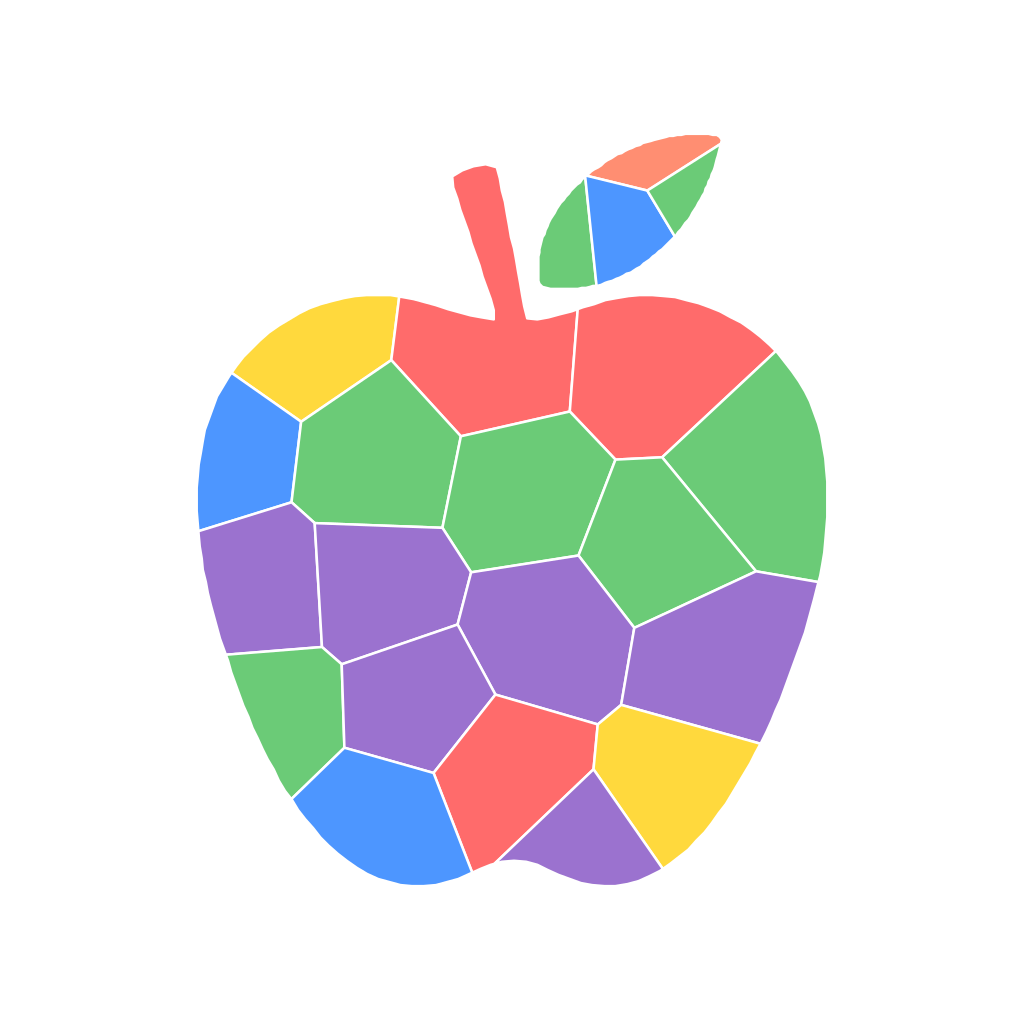
After: the same apple as a 22-piece mosaic on the easy setting, vibrant palette.
Twenty-two pieces is a fifteen-minute activity for a four- or five-year-old. Each piece is large enough for small fingers to place without tweezers, which matters more than it sounds.
Matching the piece count to your child
Difficulty settings on most generators are described in ranges, but the real number depends on the shape — a simple outline yields fewer pieces than a complicated one at the same setting. Here is what three real templates came out at:
| Setting | Example shape | Actual pieces | Rough age |
|---|---|---|---|
| Easy | Apple | 22 | 4–6 |
| Medium | Butterfly | 34 | 7–9 |
| Hard | Dinosaur | 47 | 10–12 |
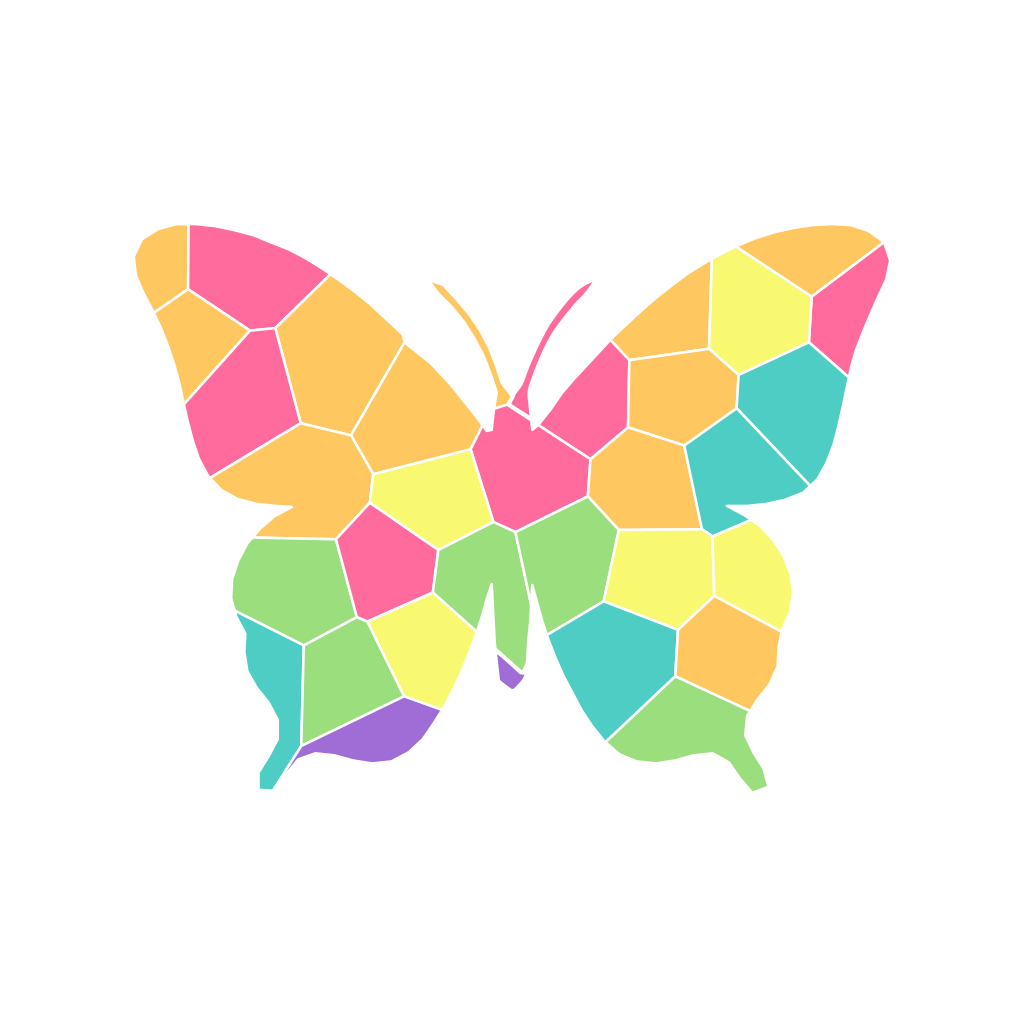
A butterfly on the medium setting: 34 pieces, rainbow palette.
A butterfly is a good middle template because its wings are symmetrical. Children work outward from the big edge pieces and the difficulty climbs naturally as they move toward the body. A dinosaur at 47 pieces has narrow legs and a tail that force genuinely careful placement — good for a ten-year-old, frustrating for a five-year-old.
Ages here are a guide, not a rule. Some five-year-olds tear through 34 pieces happily; some nine-year-olds want the quick win. Start one level below where you think your child sits.
Printing versus playing on screen
This is the part almost no template source offers. A printed sheet is a printed sheet: your child colors it in, or you cut sticker paper and they stick pieces down by number. Lovely, but it is a one-way trip, and it needs a printer with ink in it on a rainy Tuesday.
A generated mosaic can also open as an online board where the pieces are dragged into place by number. Nothing gets cut, nothing runs out, and a wrong piece just slides back. When the mosaic is finished, you can share it as a link or a QR code — grandparents scan it and see the finished picture, or open the same board and try it themselves. That is the piece the older paint-by-number sites and PDF template packs simply do not do.
For parents, the practical version of this: you make the mosaic, hand over the tablet or the printed sheet, and your child aged roughly 4 to 12 does the rest. It is not something a child sets up alone.
QrdyCraft's free tier includes 100 mosaics a month — more than one a day, which is well past what most families use. Make a mosaic template from any word →
Where to start if you want templates right now
If you would rather browse than type, the mosaic sticker gallery has ready-made templates sorted by theme — animals, space, food, holidays — each with its piece count and suggested age listed, so you can pick by difficulty rather than guessing.
For the printing-and-sticking side of things, our guide to free printable paint by sticker pages covers paper choice and cutting. And if you are still deciding whether mosaics suit your child at all, sticker mosaic art for kids walks through three ways to make one, including the no-printer version.
Frequently asked questions
What age can kids start mosaic art?
Paper and sticker mosaics work from about age four, once a child can place a piece inside a marked outline. Traditional glass-tile mosaics are usually recommended from age eight and up, because of the nipping tools and sharp edges. Start with a 20–25 piece paper or sticker template and move up from there.
Are printable mosaic templates really free?
Most are. Craft blogs and Pinterest-linked templates are free with no account. Teacher-resource sites mix free and paid — the free filter works but the selection is limited. Generators usually run on a free monthly allowance rather than a per-download charge.
What paper should I print mosaic templates on?
Plain printer paper is fine for coloring-in. If your child will be sticking pieces down, print the template on regular paper and the pieces on adhesive sticker paper, so the pieces peel and the base sheet stays flat.
What is the difference between a mosaic template and a mosaic coloring page?
A mosaic template is a picture broken into distinct pieces, usually numbered, that get colored or covered one at a time. A mosaic coloring page is generally a geometric tile pattern with no picture underneath — pretty, but there is no image to reveal at the end.
Can I make a mosaic template from my own photo?
Yes. Generators trace the outline of an uploaded photo and cut that shape into pieces. The result is a silhouette of your subject, not a photographic reproduction, so bold single subjects — a pet, a car, a person against a clear background — work far better than busy group shots.
How many pieces is too many for a young child?
Above roughly 40 pieces, most children under seven lose interest before finishing. If you are unsure, pick the easy setting: a 22-piece mosaic finished in one sitting beats a 90-piece mosaic abandoned halfway.
Frequently asked questions
What age can kids start mosaic art?
Paper and sticker mosaics work from about age four, once a child can place a piece inside a marked outline. Traditional glass-tile mosaics are usually recommended from age eight and up, because of the nipping tools and sharp edges. Start with a 20–25 piece paper or sticker template and move up from there.
Are printable mosaic templates really free?
Most are. Craft blogs and Pinterest-linked templates are free with no account. Teacher-resource sites mix free and paid — the free filter works but the selection is limited. Generators usually run on a free monthly allowance rather than a per-download charge; QrdyCraft's free tier is 100 mosaics a month.
What paper should I print mosaic templates on?
Plain printer paper is fine for coloring-in. If your child will be sticking pieces down, print the template on regular paper and the pieces on adhesive sticker paper, so the pieces peel cleanly and the base sheet stays flat.
What is the difference between a mosaic template and a mosaic coloring page?
A mosaic template is a picture broken into distinct pieces, usually numbered, that get colored or covered one at a time. A mosaic coloring page is generally a geometric tile pattern with no picture underneath — pretty, but there is no image to reveal at the end.
Can I make a mosaic template from my own photo?
Yes. Generators trace the outline of an uploaded photo and cut that shape into pieces. The result is a silhouette of your subject, not a photographic reproduction, so bold single subjects — a pet, a car, a person against a clear background — work far better than busy group shots.
How many pieces is too many for a young child?
Above roughly 40 pieces, most children under seven lose interest before finishing. If you are unsure, pick the easy setting: a 22-piece mosaic finished in one sitting beats a 90-piece mosaic abandoned halfway.