
Free Paint by Number Generator: 6 Tools Compared
The short answer: yes, several free paint by number generators exist, and most of them will hand you a printable PDF at no cost. The real difference is what happens after the download — whether your child can only paint on paper, or actually play on a screen too.
We looked at six tools that show up for this search in August 2026 and put them side by side. Every one of them converts a photo into a numbered template. Only one of them turns that template into something a 4-to-12-year-old can drag pieces into online and then share with grandma through a QR code.
Free paint by number generators compared
| Tool | Free output | Sign-up | Online play for kids | Share by QR / link |
|---|---|---|---|---|
| QrdyCraft | Printable mosaic sticker kit + online board | Free account | Yes — drag and drop | Yes |
| PBNify | Printable numbered design + colour guide | No | No | No |
| DaVinciFied | Printable PDF, no watermark | No | No | No |
| paint-by-number.com | Free downloadable design | No | No | No |
| PaintMeLike | Free template from a photo | No | No | No |
| TheGridMaker | Numbered outline + colour key | No | No | No |
Read that table honestly: the four classic converters are genuinely good at the one job they do. If all you want is a PDF to print and hand to a child with paints, PBNify and DaVinciFied are fast, free and do not make you create an account. That matters, and it is why they sit at the top of Google.
Where they stop is the screen. None of them give you a link your child can open on a tablet. None of them produce a shareable page. If you have ever printed a template at 9pm and then realised you have no printer ink, you already know why that gap is annoying.
How QrdyCraft turns a shape into a mosaic
QrdyCraft is not a paint-by-number app your child installs. It is a tool you use to make something, which your child then plays with. Three steps:
- Type a word or upload a photo. "Butterfly", "rocket", "our dog" — whatever your child is into this week. The tool builds a clean silhouette from it.
- Pick a difficulty and a colour palette. Easy, medium or hard changes how many pieces the shape is cut into. Palettes range from pastel to vibrant to ocean.
- Print it, or send the link. You get a printable sticker sheet, and an online board where the pieces can be dragged into place. Share it as a link or a QR code and it opens on any phone or tablet.
Here is the same butterfly before and after step two:

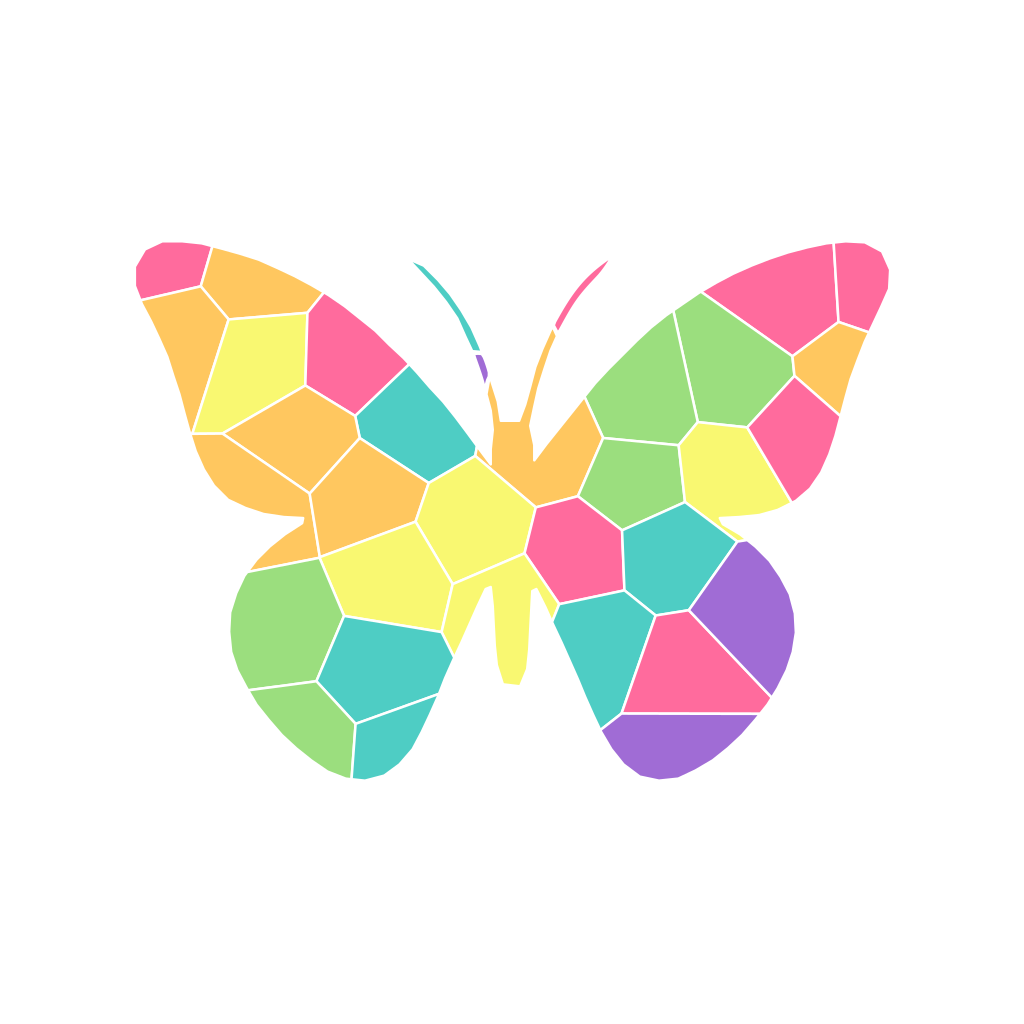
That butterfly came out at 34 pieces across 6 colours on medium difficulty. Nothing was hand-drawn in between — the silhouette on the left is what the tool generated, and the mosaic on the right is that exact shape after it was cut into polygons and coloured.
Matching the piece count to your child's age
Piece count is the single setting that decides whether a craft session ends in pride or in tears. A rough guide:
| Difficulty | Typical result | Best for | Sitting time |
|---|---|---|---|
| Easy | ~15–30 pieces | Ages 4–6 | 10–20 min |
| Medium | ~30–60 pieces | Ages 7–9 | 20–40 min |
| Hard | ~90–150 pieces | Ages 10–12 | 45+ min |
Those are ranges, not promises — the actual count depends on how detailed the shape is. A ladybug on easy came out at just 15 pieces across 5 colours, which is about right for a four-year-old who wants to finish something before snack time:
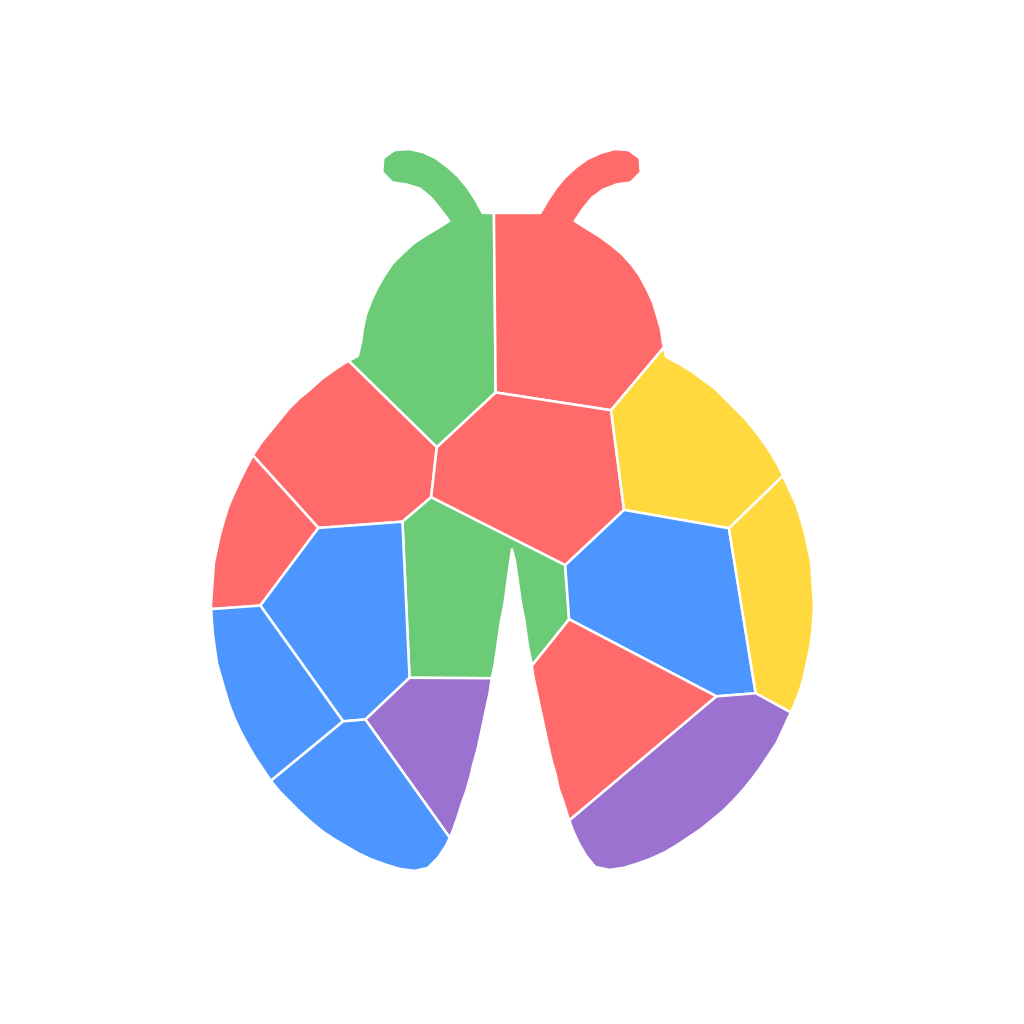
A simple silhouette like a heart or a ladybug will always produce fewer pieces than a dinosaur or a bicycle at the same setting. If the first result looks too easy or too fiddly, regenerate at a different difficulty before you print.
What "free" actually means here
Most generators are free for the basic download and charge for something else — higher resolution, more colours, a watermark-free file, or a physical kit with canvas and paints. That is a fair model and worth knowing before you start.
QrdyCraft's free tier is 100 mosaics a month — more than one a day, every day. You will hit a school holiday before you hit that limit. Paid plans exist for people making these in bulk, but a parent making one for a rainy Saturday will never see a paywall.
Make your first mosaic free at craft.qrdyai.com →
Where the other tools still win
Being fair about this is more useful than pretending otherwise:
- You want photo realism. PBNify, DaVinciFied and PaintMeLike are built around converting real photographs into many-shade paintings. QrdyCraft deliberately simplifies to bold silhouettes, because that is what works for small hands.
- You want a physical kit shipped to you. PBNify and paint-by-number.com sell canvas-and-paint kits. QrdyCraft does not ship anything.
- You want zero sign-up. Several of them require no account at all.
- You are an adult painter. Most of these tools are aimed at adult hobbyists. QrdyCraft is aimed at parents making something for a child aged 4–12.
If you are still deciding between formats, our guide to paint by sticker vs paint by number breaks down which one suits which age, and how to turn a photo into a paint by number walks through the photo route step by step. If you would rather skip the making and just print something, the ready-made mosaic gallery has hundreds of shapes already built.
Frequently asked questions
Are paint by number generators free?
Most are free for the basic download. Several charge for higher resolution, extra colours, watermark removal, or a shipped kit. QrdyCraft gives you 100 mosaics a month on the free tier, which covers ordinary family use without a paid plan.
How do I turn a picture into a paint by number?
Upload the photo to a generator, choose how many colours or pieces you want, and download the numbered template. Simple, high-contrast photos work best — a pet against a plain background converts far better than a busy group shot.
What is the best free paint by number generator for kids?
For children aged 4–12, look for one that lets you control the piece count. Adult-focused converters often produce 20+ shades and hundreds of tiny regions, which frustrates young children. Tools that cap the palette and let you pick an easy setting work much better.
Can kids do paint by numbers on a tablet instead of paper?
Usually no — most generators only output a printable file. QrdyCraft is the exception in this comparison: it produces an online board where pieces are dragged into place, shareable by link or QR code, so no printer is required.
Do I need to install an app?
No. QrdyCraft runs in a browser on any phone, tablet or laptop. You make the mosaic, then send the link or QR code to whatever device your child is using.
How many pieces should a mosaic have?
Roughly 15–30 for ages 4–6, 30–60 for ages 7–9, and 90 or more for ages 10–12. Start one level easier than you think — finishing quickly and asking for another is a much better outcome than abandoning one halfway.
Frequently asked questions
Are paint by number generators free?
Most are free for the basic download. Several charge for higher resolution, extra colours, watermark removal, or a shipped kit. QrdyCraft gives you 100 mosaics a month on the free tier, which covers ordinary family use without a paid plan.
How do I turn a picture into a paint by number?
Upload the photo to a generator, choose how many colours or pieces you want, and download the numbered template. Simple, high-contrast photos work best - a pet against a plain background converts far better than a busy group shot.
What is the best free paint by number generator for kids?
For children aged 4-12, look for one that lets you control the piece count. Adult-focused converters often produce 20+ shades and hundreds of tiny regions, which frustrates young children. Tools that cap the palette and let you pick an easy setting work much better.
Can kids do paint by numbers on a tablet instead of paper?
Usually no - most generators only output a printable file. QrdyCraft is the exception in this comparison: it produces an online board where pieces are dragged into place, shareable by link or QR code, so no printer is required.
Do I need to install an app?
No. QrdyCraft runs in a browser on any phone, tablet or laptop. You make the mosaic, then send the link or QR code to whatever device your child is using.
How many pieces should a mosaic have?
Roughly 15-30 pieces for ages 4-6, 30-60 for ages 7-9, and 90 or more for ages 10-12. Start one level easier than you think - finishing quickly and asking for another is a much better outcome than abandoning one halfway.